





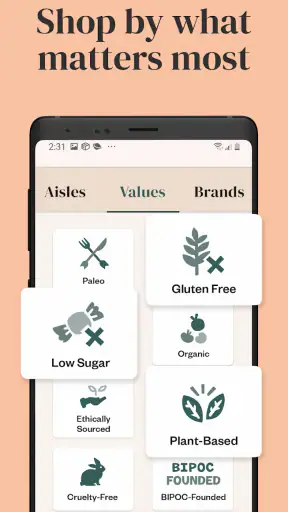

I tend to judge a shopping app by what happens when I am tired, distracted, or trying to complete a grocery order from a small screen. In that situation, Thrive Market: Shop Healthy feels more useful than a simple digital catalogue. It is a shopping app from Thrive Market focused on organic and sustainability-minded groceries, and its main appeal is helping me browse a more carefully filtered selection without visiting several specialist websites.
The app is free to install, carries an Everyone age rating, and has built a sizeable audience: its average score is 4.8 from around 51 thousand ratings, with more than a million installs. Those figures suggest that the basic shopping experience works for many people, but they do not tell the whole story. My interest here is how comfortably the app supports different abilities, routines, and shopping situations, because a convenient grocery tool can become frustrating when navigation, reading, or decision-making takes extra effort.
How comfortably the shopping experience works
Readable browsing without feeling overwhelmed
The strongest part of the experience is the basic path from browsing to choosing products. The app is built around shopping rather than recipes, social feeds, or unrelated content, so I can approach it with a clear task in mind. That matters when I am looking for a pantry staple, comparing dietary options, or building an order around a particular eating style. The product-focused structure makes more sense to me than a general marketplace where organic items are mixed into an enormous catalogue.
I found it helpful to begin with a narrow goal instead of scrolling through everything. Searching for a familiar item, then checking related choices, reduces the amount of visual information I need to process. This is a practical habit for anyone who finds dense retail screens tiring, including people with attention difficulties or limited working memory. I would not treat the app as a replacement for careful label reading, but its focused grocery environment makes the first stage of discovery less chaotic than a broad online marketplace.
Product names and packaging images do much of the communication. That is convenient when I recognize a brand or want to scan a shelf-like list quickly, but it also creates a limitation: images are not a reliable substitute for readable text. I still need to open the product details and inspect ingredients, dietary claims, and other information before buying. For shoppers with low vision, the experience will depend heavily on how comfortably the device enlarges text and how well the app responds to the phone’s own display settings.
One useful workflow is to treat the basket as a decision checkpoint rather than adding items impulsively. I can search, compare a few candidates, and then review the whole order for duplicates or unsuitable choices. That extra pause is especially valuable for people who are easily distracted by product imagery or who shop with another person’s dietary needs in mind. It also helps prevent the common mistake of choosing a product because its front label looks suitable while overlooking a detail deeper in the description.
Navigation that suits planned grocery trips
Thrive Market works best when I already know the kind of shopping trip I want to make. A planned pantry restock, a search for organic snacks, or a focused hunt for sustainable household goods gives the app a clear job. The category-based approach is less helpful when I want to wander casually and discover whatever a nearby store happens to have today. A local supermarket app may be better for checking immediate availability, while a broad marketplace can be faster for finding an obscure conventional brand.
I also appreciate that the app’s purpose is easy to understand. The developer, Thrive Market, has kept the identity centered on groceries and related household shopping rather than trying to make the experience serve every kind of retail purchase. That clarity can benefit older users and people who prefer predictable tools. At the same time, anyone who needs a very specific product may still have to move through several layers of browsing before deciding whether the available choice matches their requirements.
For a smoother session, I would make a short list before opening the app and group it by use rather than by aisle: breakfast items, lunch ingredients, cleaning supplies, or snacks for a particular family member. This reduces back-and-forth navigation and makes it easier to notice whether the basket is becoming unbalanced. It is a small adjustment, but it turns the app from an endless browsing space into a more manageable checklist.
Motor demands on a small screen
Online grocery shopping can be appealing for people who find physical stores difficult to navigate, but it does not remove every motor challenge. I still need to tap small controls, scroll through product results, open details, and manage the basket. Someone with tremors, reduced dexterity, or difficulty maintaining precise touch may find repeated selection and correction tiring. A larger phone, a tablet, or a device with system-level touch assistance could make the same process more comfortable than a compact handset.
The app is most forgiving when I slow down and verify each selection before moving on. Rapid tapping is risky in any shopping interface because it can lead to the wrong item, an accidental quantity change, or a missed detail. I would recommend using the search field and deliberate category choices instead of relying on fast swipes. This is not a special feature, but it is a realistic way to reduce motor pressure during a longer order.
People who use alternative input methods should test the complete journey rather than assuming that browsing alone represents the whole experience. The important moments are selecting a product, reviewing its details, editing the basket, and completing the purchase. If any of those steps require precise gestures or visually locating a small control, the convenience advantage may shrink. In that case, a grocery service with stronger support for the user’s preferred input method may be the better choice.
Sensory comfort and decision fatigue
Shopping for food involves more than reading. Product photography, badges, category labels, and promotional presentation can all compete for attention. I did not find the concept of the app inherently noisy, but longer browsing sessions can still become tiring because every item asks me to make another decision. This is particularly relevant for people who are sensitive to visual clutter or who experience decision fatigue when comparing similar foods.
My preferred approach is to decide the criteria first: organic certification where relevant, a dietary restriction, a preferred package size, or a maximum number of alternatives to compare. Then I use the app to find products that meet those criteria instead of evaluating every item equally. This makes the experience calmer and also reduces the chance of buying something simply because it was visually prominent.
For users with dietary sensitivities, the app can be a useful starting point, but I would not rely on a category label alone. Ingredient lists and manufacturer information deserve attention, particularly when a household member has a serious allergy. The app can help narrow the search, yet the final decision still needs the same care I would use with a physical package. That distinction is important: a convenient filter supports a decision, but it does not replace personal verification.
Where the app helps in everyday situations
A realistic example is a parent placing a grocery order after the children are asleep. The quiet, planned format can be easier than walking through a busy store, and the shopper can build a basket around school snacks, breakfast ingredients, and household basics without managing a crowded trolley. Someone recovering from an injury may also value home shopping because it reduces carrying and physical movement through a large shop.
Another useful situation is a shared household with different preferences. I can use a list to separate everyday staples from items for a particular diet, then review the basket before checkout. That is less elegant than having a dedicated meal-planning system, but it is practical. The important habit is to agree on the criteria before shopping; otherwise, the app may make it easy to add attractive alternatives without resolving what the household actually needs.
It can also suit shoppers who want to consolidate specialty purchases. Instead of visiting one shop for organic pantry goods and another for sustainability-focused household products, I can investigate both in one shopping environment. The trade-off is that this convenience depends on delivery timing, selection, and the shopper’s willingness to plan ahead. If I need an ingredient for tonight’s dinner, I would still look first at a local store or a service built around rapid delivery.
How it compares with ordinary alternatives
Compared with a supermarket app, Thrive Market has a more defined identity. A supermarket app is usually stronger for local store inventory, familiar weekly shopping, and immediate collection, while this app is more appealing when I want to explore organic or sustainability-oriented choices in one place. The specialist focus can save time for a certain kind of shopper, but it may feel restrictive if my basket is mostly ordinary household groceries.
Compared with a general marketplace, the narrower purpose is a benefit. I spend less time filtering out unrelated products and can approach the catalogue with a clearer expectation. The general marketplace may still win on breadth, brand familiarity, or the ability to combine groceries with unrelated purchases. I would choose Thrive Market when the values and product focus matter more than having the largest possible selection.
Compared with shopping in person, the app removes travel and some physical strain but also removes the ability to inspect a package directly. That difference matters for shoppers who depend on large-print labels, tactile cues, or immediate confirmation of freshness and size. The best option depends on the task: planned pantry shopping is a natural fit, while highly visual or time-sensitive purchases may be easier in a store.
Remaining barriers worth considering
The biggest barrier is not the idea of online grocery shopping; it is the amount of responsibility left with the shopper. I still need to interpret product information, compare alternatives, manage the order carefully, and make sure the result matches household needs. For a confident reader, that is manageable. For someone who has difficulty reading dense descriptions, distinguishing similar packages, or remembering several requirements at once, the process may require help from another person or a device’s accessibility tools.
Cost and commitment can also affect suitability, even though downloading the app itself is free. A free app does not automatically make every shopping arrangement affordable, and a specialist grocery service may not be the right fit for a household whose priority is the lowest possible total. I would compare the final basket with a normal supermarket trip rather than judging value from individual product impressions. The convenience of a focused catalogue is meaningful, but it should be weighed against delivery arrangements and the price of the complete order.
Another limitation is the difference between digital access and physical access. Home delivery can help someone who cannot easily travel, lift bags, or tolerate crowded shops, but receiving an order may still involve timing, carrying, storage, or assistance at the door. A user with mobility limitations should think through the entire journey from browsing to putting groceries away. The app improves one part of that chain; it cannot solve every practical problem surrounding delivery.
I would also be cautious about using it as the only tool for complex medical diets. It can make discovery easier, but a person managing severe allergies, medically prescribed nutrition, or multiple restrictions should verify every item and may benefit from a clinician, caregiver, or trusted shopping partner. That is not a criticism unique to this app. It is a reminder that grocery filters are helpful aids, not medical guarantees.
What I would recommend before relying on it
I would begin with a small order or a short planned list rather than attempting a full household shop immediately. This gives me a chance to see whether the text is comfortable, whether product details are easy to review, and whether the basket controls suit my motor needs. It also reveals whether the app’s selection matches the products I actually buy instead of the products I merely find interesting.
For readability, I would enable the phone’s preferred text size and display contrast before browsing, then check whether product descriptions remain comfortable at that setting. For motor access, I would test the app with the input method I normally use and pay particular attention to basket editing. For sensory comfort, I would shop in short sessions, use a prepared list, and avoid comparing too many similar products at once.
A second person can make the app more inclusive without taking over the entire process. One household member might read a detailed ingredient panel while the other manages the list, or a caregiver might help with the first order and leave the user to repeat the familiar workflow later. This shared approach is especially useful when the shopper wants independence but finds certain reading or precision tasks difficult.
The current version is 2.144.0, and the app supports Android 7.0 or later. That makes it relevant to people who keep an older Android phone, although the age of a device can still affect screen size, speed, and compatibility with system accessibility options. I would update the phone where possible and allow enough time for the first session, particularly if the device is not recent.
My inclusive verdict
After looking at the app through the lens of different abilities and situations, I see a useful specialist shopping tool rather than a universal answer. Its focused grocery catalogue, planned browsing style, and home-shopping format can support people who want fewer physical trips, a calmer alternative to crowded stores, or an easier way to investigate organic and sustainability-minded products. The app is especially convincing for organized shoppers who know what they need and are comfortable checking details before ordering.
I would hesitate to recommend it as the sole option for someone who needs highly simplified controls, extensive assistance with reading, immediate local availability, or the lowest possible grocery cost. A supermarket app, a local delivery service, or a shared shopping routine may work better in those cases. People with serious dietary restrictions should also treat the app as a research and purchasing aid, not as a substitute for checking every ingredient.
Overall, I think Thrive Market earns its place on my phone when I want a deliberate, values-focused grocery search rather than a rushed convenience purchase. Its accessibility is strongest at the level of choice and situation: I can shop from home, work from a list, and avoid some of the physical and sensory demands of a store. The remaining barriers are mostly in detailed reading, precise touch interaction, delivery logistics, and careful decision-making. If those parts fit your routine, the free app is worth trying; if they do not, a more locally oriented or assistance-friendly alternative may serve you better.


